Team & roles · Article 6 of 6
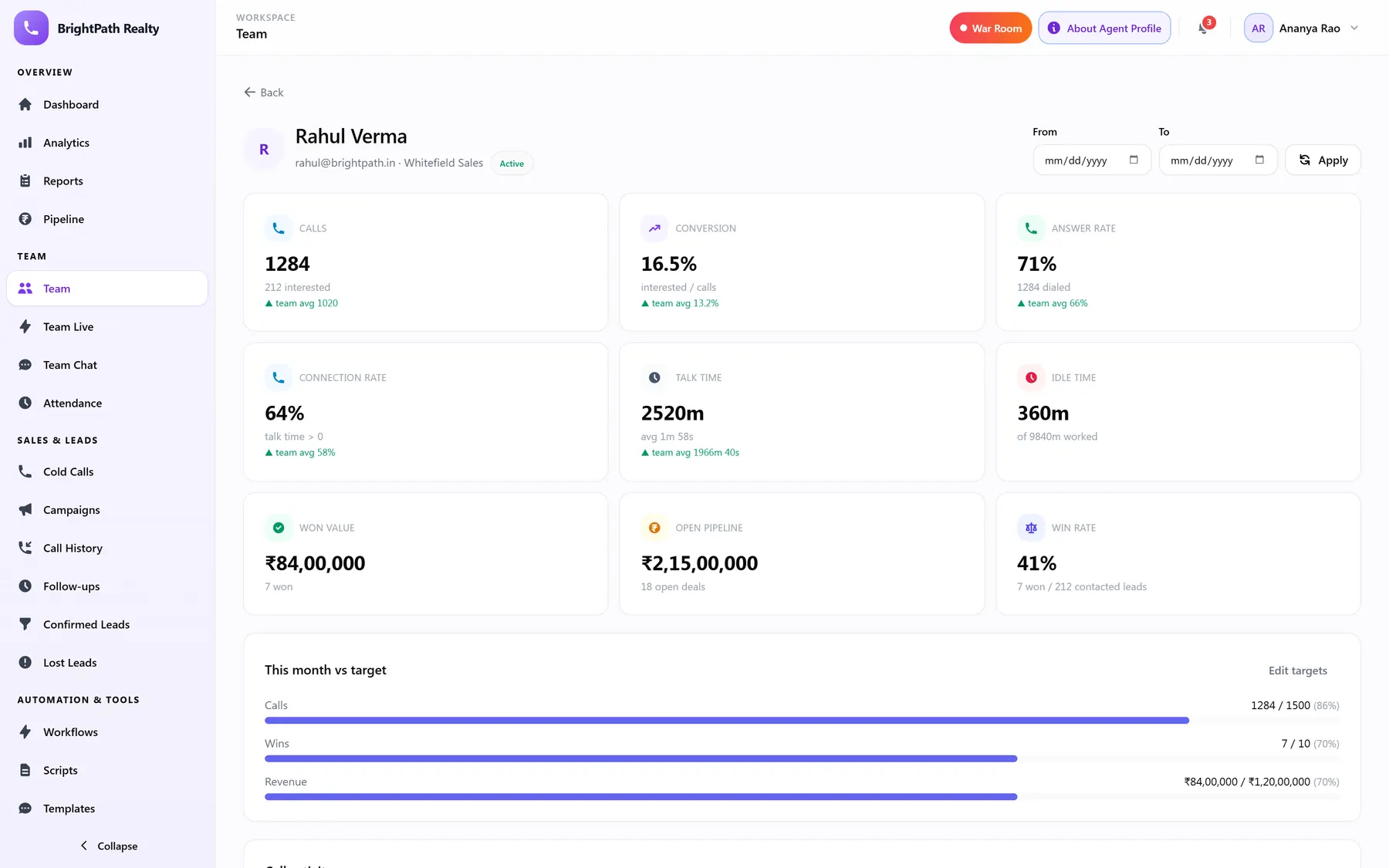
Agent profile and monthly targets
See one agent's calls, talk time, conversion and revenue — and set monthly targets.
Every agent has a profile page with their performance in one place. Use it for one-on-one reviews and coaching.
Open an agent's profile
Go to Team → Team Members and click the agent's name (View agent details).
What you'll see
Key numbers for the period you choose (use From and Apply to change dates):
| Number | Meaning |
|---|---|
| Calls | Calls made |
| Conversion | Calls that ended in a conversion status |
| Answer rate | Share of calls the customer picked up |
| Connection rate | Share of calls that connected |
| Talk time | Total time spent talking |
| Idle time | Time on shift without being on a call |
| Won value / Wins | Deals closed and their value |
| Open pipeline | Value of deals they're still working |
| Win rate | Won deals ÷ closed deals |
Below that: Call activity (a chart), Recent calls and Pending follow-ups.
Set monthly targets
- On the profile, find This month vs target.
- Set Calls / month, Wins / month and Revenue / month.
- Save — you'll see Target saved.
Progress bars then show how the agent is tracking this month, and how they compare with the team average.
Tip
Targets also appear in the War Room and on the agent's own home screen, so everyone knows where they stand.