Messaging · Article 3 of 4
Email via SMTP
Send emails to leads from your own email address — Gmail, Zoho, Outlook or any SMTP provider.
Connect your email provider so agents can email leads from the CRM, from your own address.
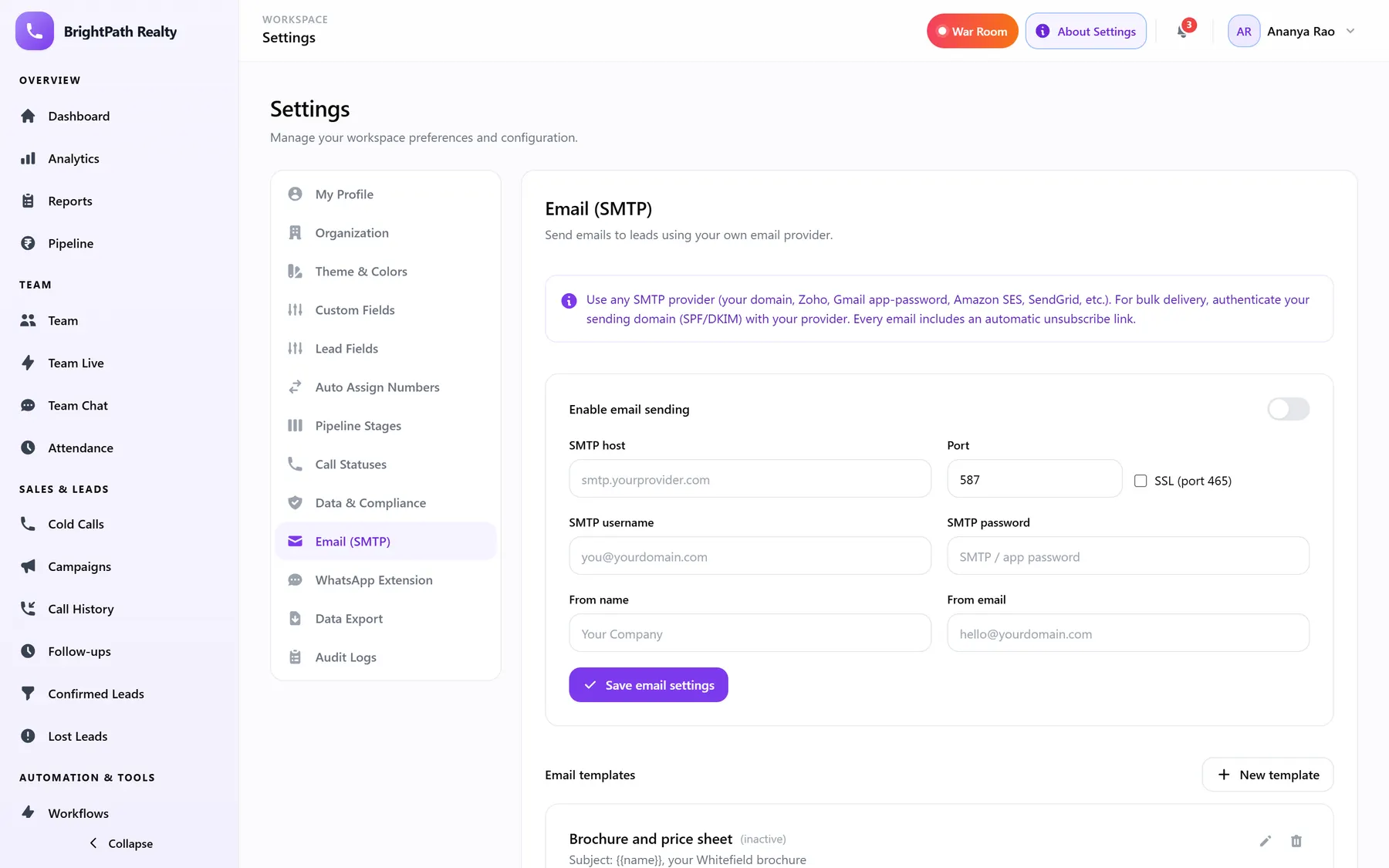
Connect your email
- Go to Settings → Email (SMTP).
- Switch on Enable email sending.
- Fill in your provider's details:
| Field | Example |
|---|---|
| SMTP host | smtp.gmail.com · smtp.zoho.in · smtp.office365.com |
| Port | 587 (or 465 with SSL ticked) |
| SMTP username | Your full email address |
| SMTP password | Your password, or an app password for Gmail and Outlook |
| From name | e.g. BrightPath Realty |
| From email | e.g. sales@brightpath.in |
- Click Save email settings.
Tip
Gmail and Google Workspace need an app password (Google Account → Security → App passwords), not your normal password.
Send a test email
Under Send a test email, enter To email, pick a Template and click Send test. Check the inbox (and spam folder).
Email templates
Click New template and add a Template name, Subject and Body (HTML allowed). You can also create email templates on the Templates page.
Suppression list
Emails that bounced or unsubscribed. We skip sending to these. Add an address by hand with Add if someone asks not to be emailed.