Pipeline & revenue · Article 1 of 3
Pipeline stages
Name the steps of your sales process — New, Contacted, Site Visit, Negotiation — and set a win probability for forecasting.
Pipeline stages are the steps a deal goes through, from first contact to closing. They're the columns on the Confirmed Leads Kanban board and the bars on the Pipeline page.
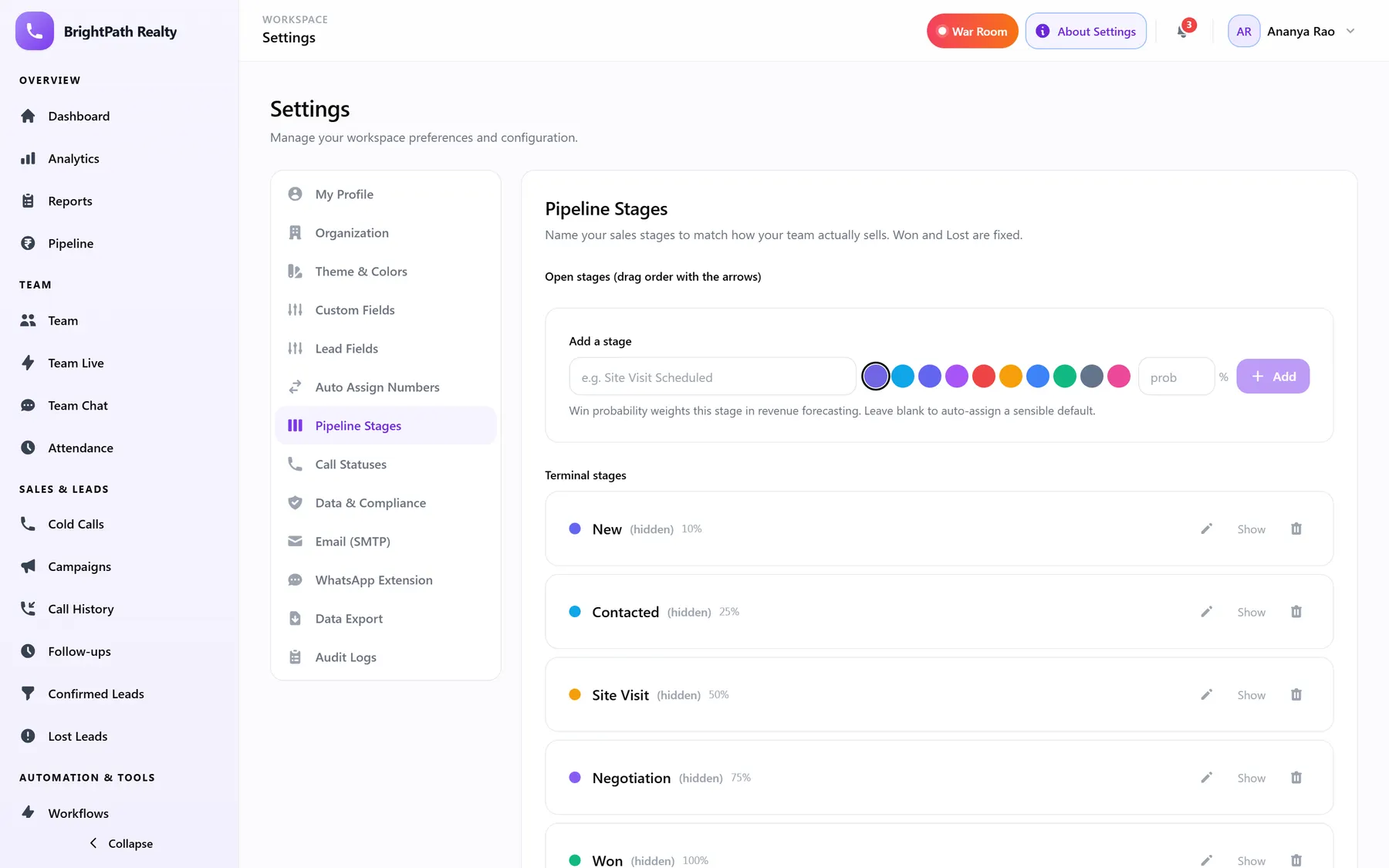
Set up your stages
- Go to Settings → Pipeline Stages.
- Under Add a stage, type a name — e.g. Site Visit Scheduled — pick a colour, and optionally a win probability (%).
- Click Add. You'll see Stage added.
- Use the arrows to put Open stages in order.
Won and Lost are fixed terminal stages — every deal ends in one of them.
Win probability
The win probability is the chance that a deal at this stage ends up won. It's used to build your revenue forecast. Leave it blank and TeleCalling CRM picks a sensible default (shown as auto).
Example for a real-estate team:
| Stage | Win probability |
|---|---|
| New | 10% |
| Contacted | 20% |
| Site Visit | 40% |
| Negotiation | 70% |
| Won | 100% |
Rename or remove a stage
Click Rename / recolour to edit a stage, or Delete stage to remove one you added.
Pair stages with call scripts so agents see the right pitch for each stage.